Xeel

Facial recognition time attendance

Pay the people who showed up. Not the names on the list.

Xeel face attendance clocks every worker in and out with their face on an Android phone or tablet at the site — a blink, a match, the time and the coordinates — with no signal needed. Put casual and shift workers on a daily or hourly rate, and payday pays the days and hours their face proved. Nothing more.

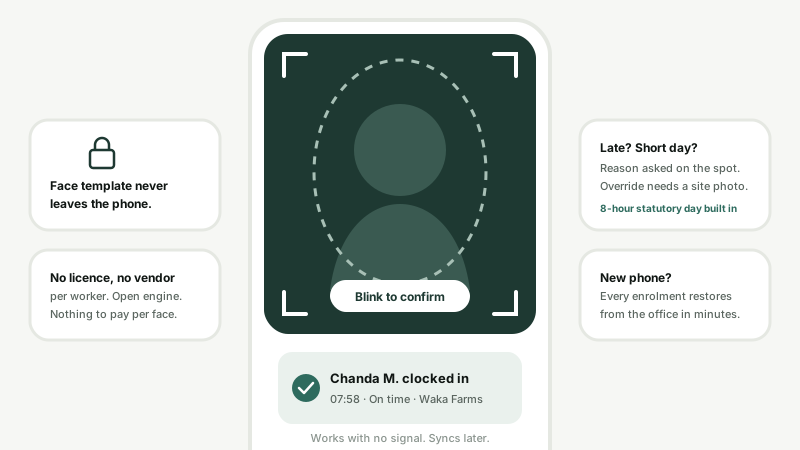
A worker clocking in with their face on the O'Sense app: blink check, on-time confirmation, template kept on the device

Where the wage bill leaks

You are paying for days nobody worked.

A farm with 80 workers found the same three cards clocking in for twelve people. Every one of those days was paid.

Buddy punching

A card is lent, a PIN is shared, a friend signs the register. With a face and a blink, the worker has to be standing there.

Ghost workers

A name on the payroll that never comes to site. A daily-rate worker with no face clock-ins is paid for no days.

Padded hours

A register written up on Friday from memory. Here the hours are measured between a face in and a face out, on the server's clock.

Face clock-in on an Android device at the site gate, with the time, the coordinates and whether the worker was late

One phone at the gate. The whole site clocked.

Enrol each worker once. From then on they look at the phone or tablet at the gate, blink, and are clocked in — and do the same to clock out. Matching runs on the device, so a morning muster of hundreds moves at the pace of a glance, with or without signal.

  • Blink liveness check — a printed photo or a picture on a screen does not pass
  • The time comes from the server's clock, so changing the phone's time changes nothing
  • GPS coordinates and their accuracy on every clock-in and clock-out
  • Saved on the device first and sent when signal returns, never twice
  • Template encrypted on the device; only the enrolment photo reaches the office
app.osense.io/dashboard/payroll
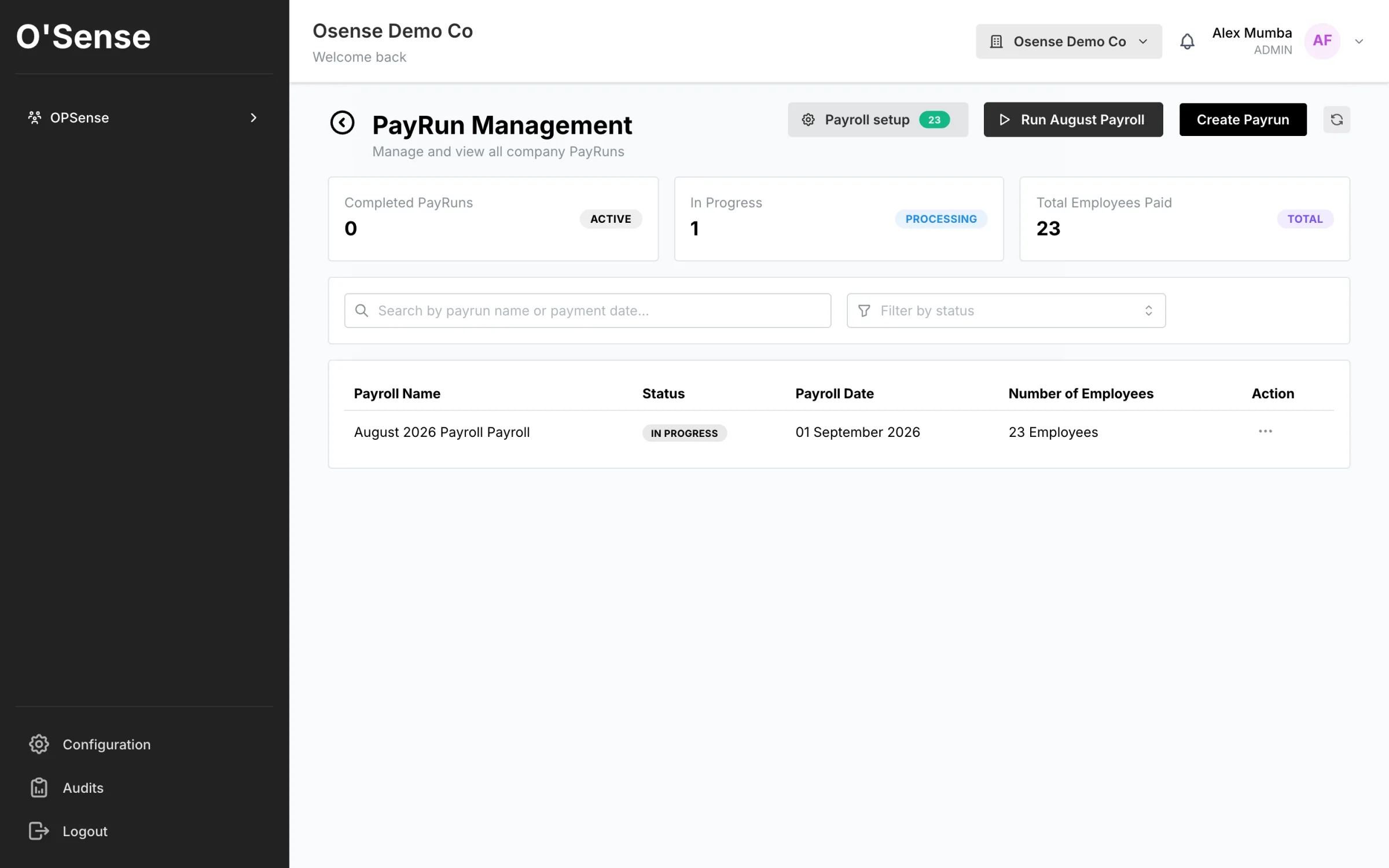
Xeel pay runs, paid from the days and hours workers clocked with their face

Payday reads the clock.

Choose how each worker is paid. On a daily rate, the pay run pays the days their face clocked in. On an hourly rate, it pays the hours between their face in and their face out. PAYE, NAPSA and NHIMA are worked out on what was actually earned, and the payslip goes to the worker on WhatsApp.

  • Daily rate: days clocked × the rate — no clock-in, no pay for that day
  • Hourly rate: hours clocked × the rate, measured on the device
  • A day with no clock-out pays no hours, and is named before you release the run
  • Monthly salary: paid as normal, with present, absent, late and short days on the timesheet
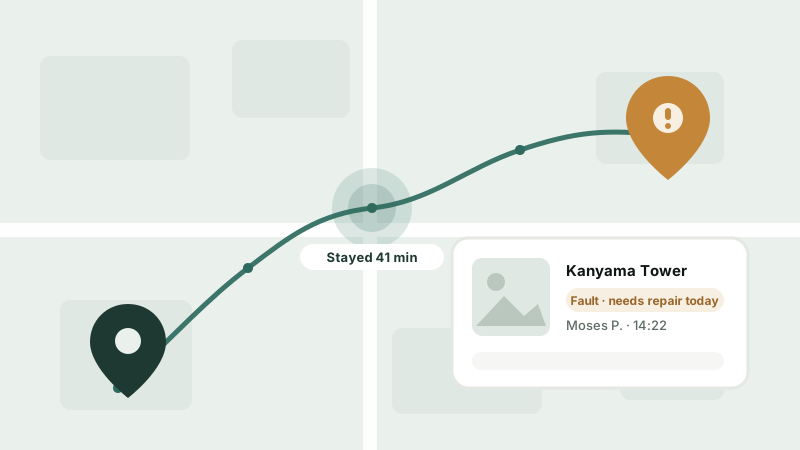
FieldOps map of a farm: the route a worker walked, where they stayed and what they reported

Pay for what got done, not just who came.

On a farm, a day is not the unit of work — a row, a kilogram or a hectare is. FieldOps gang sheets record each worker's units on a task, with a day-rate floor, and send them to Xeel as pay on the next run. Security companies send the hours guards worked on patrol shifts to Xeel as overtime for HR to approve.

  • Piece rates per row, kilogram, hectare or head, with a day-rate floor
  • Send to Xeel once — the same work cannot be paid twice
  • A worker with no Xeel record is listed, never silently dropped
  • Guard overtime from patrol shifts arrives for HR approval, not paid blind
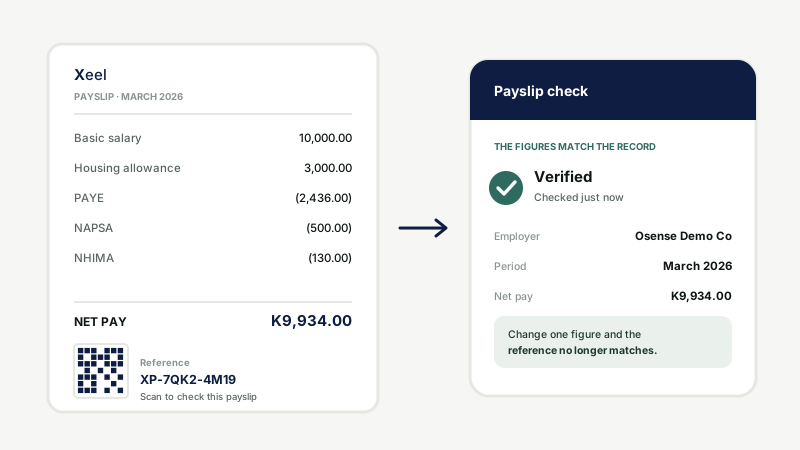
A timesheet carrying a verification code that opens the record behind it

Every exception leaves evidence.

When a face is not recognised, a supervisor can override — with a reason and a photo of the place that cannot be skipped, and the face the camera saw kept beside it. A worker leaving before the minimum day gives a reason. The office sees all of it, by worker and by day.

  • Short shifts against the 8-hour statutory day, with a reason: sick, injury, permission, half day, emergency
  • Lateness in minutes against your start time
  • An attendance map of where each clock-in happened, overrides highlighted
  • Monthly timesheet to PDF with a verification code, or to Excel

Built for sites with no signal and workforces paid by the day.

Farms, security posts, construction sites, depots and factories — wherever a register is a clipboard today.

Offline Matched on the device, synced later
Per day · per hour · per unit Pay follows what the clock and the gang sheet recorded
No per-worker fee An Android phone you already own

Compared

Four ways to take a register. One that pays from it.

Paper registerCards or PINsFingerprint terminalXeel face attendance
Can be done for a friendYes — anyone can signYes — cards get lentHarderNo — face and a blink, on the spot
HardwareA bookA reader and cards to replaceA terminal at every gateAn Android phone or tablet
Worn or dusty hands——Can fail to readTouch-free
No signal at the siteWorksDepends on the systemDepends on the systemWorks, syncs later
Where it happenedNoThe gate it was read atThe gate it was read atGPS on every clock event
Into payrollRetyped by handUsually an exportUsually an exportDaily and hourly pay straight from the clock

Questions

Face attendance, answered.

What is facial recognition time attendance?

It is a clock-in where the worker's face is the proof instead of a card, a PIN or a signature on a register. With Xeel the worker looks at an Android phone or tablet at the site and blinks; the app matches the face against the workers enrolled on that device and records the time, the coordinates and whether they were late. They do the same to clock out, so the hours worked are measured rather than written up.

How do I pay workers only for the days they actually came to work?

Put them on a Daily rate in Xeel. The pay run counts the days each worker clocked in with their face and pays those days at their rate, then works out PAYE, NAPSA and NHIMA on the result. A worker who did not clock in on a day is not paid for it, and nobody types the days in by hand.

Can I pay hourly workers from the hours they clocked?

Yes. For a worker on an Hourly rate, the pay run takes the hours measured between their face clock-in and clock-out and multiplies them by the rate. A day with a clock-in but no clock-out pays no hours, and the run names those days before you release it so they can be checked first.

What about salaried staff who miss days or come in late?

Monthly-salaried staff are paid their salary as normal; Xeel does not deduct for absence or lateness by itself. What it gives HR is the evidence: a monthly timesheet per employee with days present, absent, late and short, and the minutes late, exportable as a PDF with a verification code or as Excel. If you want pay to follow attendance exactly, put those workers on a Daily or Hourly rate.

Can I pay farm workers by the piece?

Yes, through FieldOps. A gang sheet on a farm task records each worker's units -- rows, kilograms, hectares or head -- with a day-rate floor, and Send to Xeel turns it into a pay item on that worker's next pay run. The same work cannot be sent twice, and any worker without an Xeel record is listed rather than silently dropped.

Can someone clock in for a friend with a photo?

A printed photo or a picture on a phone screen does not pass: the clock-in asks for a blink and checks that the eyes open, close and open again on a live face. Cards get lent and PINs get shared; a face has to be there. The same face also cannot be enrolled under two workers without a recorded override.

Does facial recognition attendance work without internet?

Yes. Matching runs on the device itself, and every clock-in and clock-out is saved on the phone first and sent when signal returns, each with a key so nothing is recorded twice. The time is taken from the server's clock, not the phone's, so changing the time on the handset does not change the record.

What hardware do I need?

An Android phone or tablet. One device at the gate clocks in a whole site -- it is designed for a morning muster of hundreds of workers, and kiosk use is the normal way it runs. There is no fingerprint terminal to buy and no per-worker licence. The face clock-in is on Android only; it is not available on iPhone.

What happens when a face is not recognised?

The supervisor can override, but not quietly: an override needs a reason and a photo of the place that cannot be skipped, and the face the camera saw is kept beside it. The office sees both on the web. Overrides are never offered when the app suspects a spoof.

Does it check that the worker is at the site?

It records where every clock-in and clock-out happened -- the coordinates, how accurate the fix was, and whether it was a live fix or the last one the phone had -- and the attendance map plots them by day. It does not refuse a clock-in for being outside a boundary, because a worker should never be locked out of the register by a weak GPS signal.

Where is the face data kept, and is it legal in Zambia?

The face template -- the numbers a face is turned into -- is stored encrypted on the device, with the key in the Android Keystore, and is never uploaded. Only the enrolment photo reaches the office, so a replacement phone can be set up again. How O'Sense handles biometric data under Zambia's Data Protection Act 2021 is set out in the privacy policy.

How much does face attendance cost?

Face clock-in is part of Xeel, which is priced per month as one app; there is no charge per worker or per face. The employee register is free with every plan. Message us on WhatsApp for current pricing; we set the company up ourselves.
Known limits — not bugs. Face clock-in runs on Android, not iPhone. A clock-in outside a site boundary is recorded with its coordinates, not refused. Salaried staff are paid their salary; attendance is shown to HR rather than deducted automatically. The blink check stops a photo or a screen; it is not a claim that no attack can ever work.

Where it is used

Built for the teams a clipboard cannot count.

Stop paying for days nobody worked.

Message us on WhatsApp and we will set your site up — enrol the faces, choose daily or hourly pay, and run your first payroll from the clock.

O'Sense is a subsidiary of HERO CONTROL SYSTEMS Ltd
Stand 34, Harrison Chongo Rd, Woodlands Extension, Lusaka, Zambia