How do employees request money on WhatsApp?
They text it in plain words to the company's O'Sense number -- for example "I need K40 for nails". AI reads the amount and what it is for, and asks for anything missing ("What is the K40 for?"). The employee sees who the request will go to and taps Send. Above a limit you set, it asks for a photo of the quote first.
Who approves a money request?
The amount decides. In MoneySense settings you set bands of approvers -- for example their manager for small amounts, then a director above a figure -- and they approve in order. Each approver gets the request on WhatsApp with Approve, Reject and Ask for info buttons, and only a tap from the approver whose turn it is counts. Nobody can approve their own request.
Does O'Sense send the money?
No. O'Sense records the money; it does not move it. Once a request is approved, the person who pays taps Paid cash, Paid mobile money or Paid by bank after handing it over, and that books the advance to the right account. The money itself goes out the way it always has.
How is a staff advance accounted for?
The employee photographs each receipt on WhatsApp and confirms which request it belongs to. Each receipt becomes an expense against the advance, and the bot tells them what is still to account for. When the receipts cover it, the request closes itself. Change handed back, or a balance recovered through payroll, is recorded by finance on the web.
How do I log an expense by photographing a receipt?
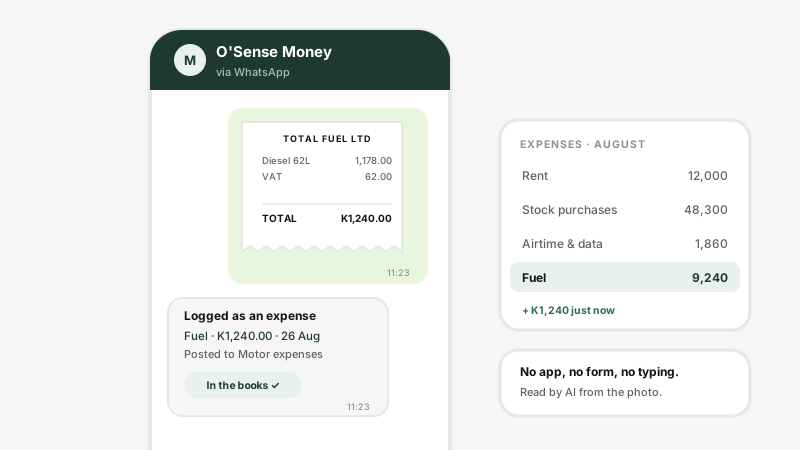
Send the photo to your company's WhatsApp receipts number. AI reads the shop, the date, the total and the line items, then asks how it was paid -- reply CASH, MOBILE MONEY or BANK, or OK for your usual. That reply posts it, and the bot answers with the journal number.
Does the expense really post to the accounts?
Yes, as a proper double-entry journal: the expense account is debited and Cash, Mobile money or Bank is credited, in the month on the receipt. If that month is already closed, it goes into the next open month as a late entry rather than changing closed books. The photo stays attached to the expense as evidence.
What if the receipt is blurry or the AI is not sure?
It asks instead of guessing. Two separate readings of the receipt have to agree on the total and the date; if they do not, the bot asks for exactly what is unclear -- "I read it two ways -- 13000 or 180?" -- and nothing posts until it is answered. A wrong amount, date, shop or payment method can be corrected by reply.
How does it choose the expense account?
Your own rules come first -- for example, anything from a fuel station goes to Fuel. Otherwise AI picks from your own chart of expense accounts, and only when it is confident; when it is not, the expense goes to General so nobody's guess ends up in the wrong account.
Can the same receipt be claimed twice?
A photo that has been sent before is answered "already logged" and nothing is created. A different photo with the same shop and amount on the same day is held back unposted and the sender is asked about it.
Who is allowed to send receipts and requests?
Only people you have let in. For receipts, an admin creates an invite code and the staff member texts JOIN with the code once; unknown numbers are not accepted. Money requests come from employees matched to their staff record by phone number, once your company has switched requests on.
Does it read VAT from the receipt?
Not from WhatsApp. The receipt's total, shop, date and items are read; VAT is marked on the expense in the web dashboard, where an expense can be flagged as VAT-claimable with its amount.
How much does it cost?
WhatsApp receipts and money requests are part of MoneySense, which is priced per month as one app. The employee register is free with every plan. Message us on WhatsApp for current pricing; we set up your receipts number ourselves.