app.osense.io/dashboard/workshop
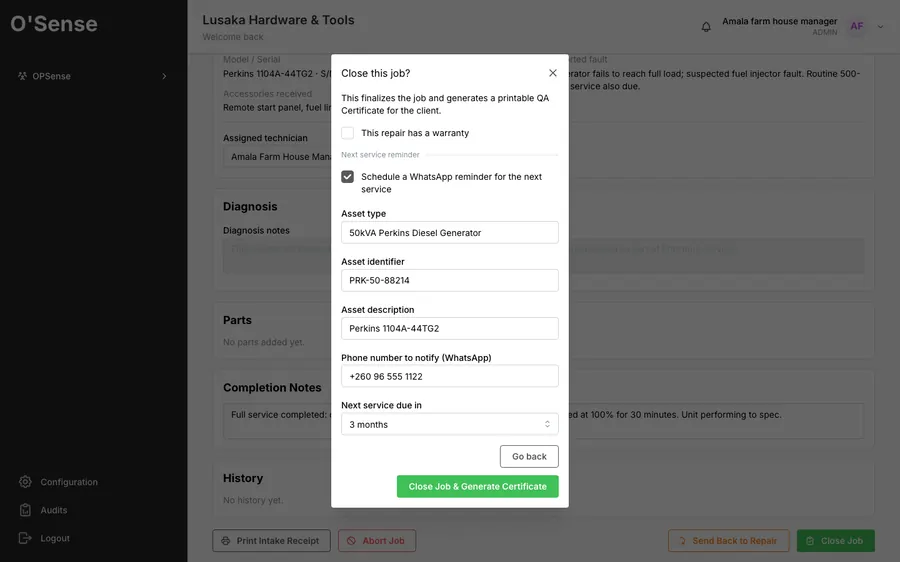
Real screenshot: closing a job and setting the next-service reminder
Auto mechanics, generator servicing, equipment maintenance — close the job in O'Sense and it WhatsApps your customer automatically when the next service is due. No sticky notes, no relying on memory.
Real screenshot: closing a job and setting the next-service reminder
The Problem
A generator gets serviced. Three months later you're meant to check in. You forget. So does the customer — until their equipment fails again and they call whoever's closest, not necessarily you.
Pick 1, 3 or 6 months when you close the job. O'Sense remembers so you don't have to.
The reminder goes out automatically, in business hours, on the number you already have on file.
Workshop job cards show every repair by status — received, diagnosing, awaiting parts, in repair, QA, closed.
Customers, staff, staff payroll, quotations and invoicing and receipts, in the same login.
Questions
O'Sense Workshop. Close the job and pick when the next service falls due — one month, three or six. When the date arrives O'Sense sends the customer a WhatsApp message itself, in business hours, and they book again.
Yes. A Workshop job card holds the diagnosis, the parts used, the labour, the warranty and the completion notes against the specific asset — by type, serial and description — so the next time that machine comes in, its whole history is already there.
Yes. Closing a job in Workshop generates a printable QA certificate for the client.
Yes. Quotations and invoices are in SalesOps, on the same login. A quotation converts to an invoice, then to a delivery note and a receipt, carrying the same client, line items and prices each time.
Launch O'Sense free, or chat with us on WhatsApp first.